Setup and verification
GCC with C++20, CMake 3.25 or later, CTest and Python 3. Qt 6.8 with Core, Widgets and Test. Qt Network is also required. Qt SQL with the QSQLITE plugin is also required. Set CMAKE_PREFIX_PATH to your Qt installation if it is not discovered automatically. Locally checked with Qt 6.8.3. Extract the ZIP into a new folder. python3 run_checks.py checks example and solution in a temporary copy and preserves your files. Run python3 verify.py for your own build. The demo is then available at build/order_lab. Qt demos use English labels. Automated widget tests default to offscreen. Run the visible demo in a desktop session without QT_QPA_PLATFORM=offscreen. Native Windows execution is not verified.
Verified on 2026-10-21 on Linux x86_64. Qt workflow covering creation, database reopening, editing, malformed import, stale previews, SQL rollback and file round trips. Local HTTP import is confirmed through real buttons. Additional model, network and file tests plus a persistent batch-action solution. Linux offscreen, without native Windows or multi-process acceptance testing.
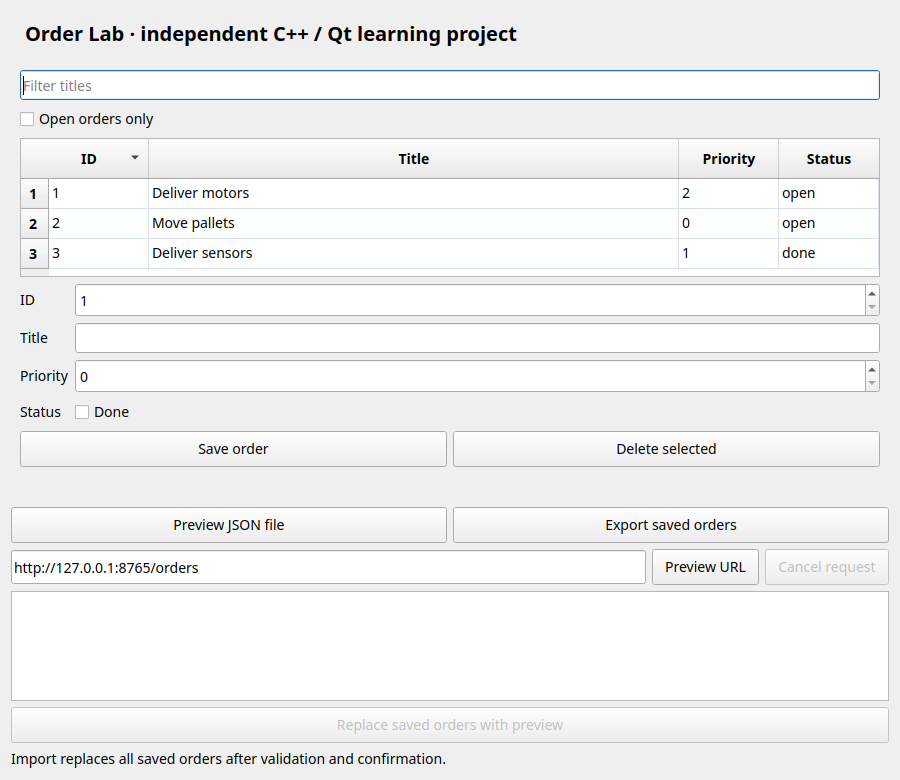
Order Lab combines the new series into a small desktop application. It uses FactoryForge's logistics theme but is an independent teaching project. The FactoryForge game simulation is neither embedded nor modified. The focus is on verifiable decisions: persistent storage, preview before replacement, preservation on failure and understandable tests.
Package contents and individual files
- CMakeLists.txt
- demo_server.py
- download.hpp
- files_tests.cpp
- fixtures/orders-v1.json
- fixtures/orders-v2.json
- http_fixture.hpp
- json_orders.hpp
- main.cpp
- model_tests.cpp
- network_tests.cpp
- order.hpp
- order_editor.hpp
- order_model.hpp
- repository.hpp
- result.hpp
- solution.cpp
- sql_test_helper.hpp
- sqlite_repository.hpp
- test_support.hpp
- tests.cpp
- verify.py
- window.hpp
- run_checks.py
01Start the app with its own database
Extract the complete package and run python3 verify.py. Then ./build/order_lab --database orders.sqlite opens its own SQLite file. Without an argument the app uses its Qt application-data directory. The English-labelled UI contains an order table and editing form. It imports no data from an existing FactoryForge installation.
#include "sqlite_repository.hpp"
#include "test_support.hpp"
#include "window.hpp"
#include <QApplication>
#include <QCommandLineParser>
#include <QDir>
#include <QStandardPaths>
#include <iostream>
int main(int argc, char **argv) {
  QApplication app(argc, argv);
  app.setApplicationName("AppFabrikOrderLab");
  app.setStyle("Fusion");
  app.setStyleSheet(
      "QWidget { font-size: 14px; } QPushButton { padding: 7px 12px; } "
      "QLineEdit, QSpinBox { min-height: 28px; } QTableView { gridline-color: "
      "#d8e2ec; alternate-background-color: #f2f6fb; } QHeaderView::section { "
      "padding: 8px; font-weight: bold; }");
  QCommandLineParser parser;
  parser.addHelpOption();
  parser.addOption({"database", "Use this SQLite database", "path"});
  parser.addOption(
      {"screenshot",
       "Render a screenshot and exit. Requires a new explicit database path",
       "path"});
  parser.process(app);
  auto path = parser.value("database");
  if (parser.isSet("screenshot") && (path.isEmpty() || QFile::exists(path))) {
    std::cerr << "Screenshot mode requires a new --database path\n";
    return 1;
  }
  if (path.isEmpty()) {
    const auto directory =
        QStandardPaths::writableLocation(QStandardPaths::AppDataLocation);
    if (!QDir().mkpath(directory))
      return 1;
    path = directory + "/orders.sqlite";
  }
  orders::SqliteRepository repository(path);
  orders::OrderService service(repository);
  auto loaded = service.list();
  if (!orders::succeeded(loaded)) {
    std::cerr << std::get<orders::Error>(loaded).message << '\n';
    return 1;
  }
  if (parser.isSet("screenshot") &&
      !orders::succeeded(service.replace(samples())))
    return 1;
  orders::OrderWindow window(service);
  window.show();
  if (parser.isSet("screenshot")) {
    const auto image = parser.value("screenshot");
    QTimer::singleShot(250, &window,
                       [&] { app.exit(window.grab().save(image) ? 0 : 1); });
  }
  return app.exec();
}
The application starts with an empty table and a new database.
02Explain the dependencies
The UI talks to OrderService. The service knows a repository interface and plain C++ domain types. SqliteRepository implements the persistence contract. The network loader delivers validated documents to the import preview. In an interview this flow lets you explain which parts are tested without a UI and which use a real database.
#pragma once
#include "order.hpp"

namespace orders {
class OrderRepository {
public:
  virtual ~OrderRepository() = default;
  virtual Result<std::vector<Order>> list() const = 0;
  // Contract: failure leaves the previously committed batch intact.
  virtual Result<Done> replaceAll(std::span<const Order> batch) = 0;
};
class MemoryRepository final : public OrderRepository {
  std::vector<Order> data_;

public:
  Result<std::vector<Order>> list() const override { return data_; }
  Result<Done> replaceAll(std::span<const Order> batch) override {
    return replaceValidated(data_, batch);
  }
};
class OrderService {
  OrderRepository &repository_;

public:
  explicit OrderService(OrderRepository &repository)
      : repository_(repository) {}
  Result<std::vector<Order>> list() const { return repository_.list(); }
  Result<Done> replace(std::span<const Order> batch) {
    auto result = validateBatch(batch);
    if (!succeeded(result))
      return std::get<Error>(result);
    return repository_.replaceAll(batch);
  }
  Result<Done> save(const Order &order) {
    auto result = repository_.list();
    if (!succeeded(result))
      return std::get<Error>(result);
    auto batch = std::get<std::vector<Order>>(std::move(result));
    auto found = std::ranges::find(batch, order.id, &Order::id);
    if (found == batch.end())
      batch.push_back(order);
    else
      *found = order;
    return replace(batch);
  }
  Result<Done> remove(int id) {
    auto result = repository_.list();
    if (!succeeded(result))
      return std::get<Error>(result);
    auto batch = std::get<std::vector<Order>>(std::move(result));
    std::erase_if(batch, [id](const Order &order) { return order.id == id; });
    return replace(batch);
  }
};
} // namespace orders
The application core needs neither QWidget nor SQL queries.
03Make import a reviewable action
Preview JSON file can load fixtures/orders-v1.json. The preview shows count, IDs, titles, priorities and status. Only Replace saved orders with preview replaces persisted data. An empty list is also a complete replacement. If orders are saved after the preview is created, the app rejects committing it and requires a new preview.
#pragma once
#include "download.hpp"
#include "order_editor.hpp"
#include <QFileDialog>
#include <QPlainTextEdit>
#include <optional>

namespace orders {
class OrderWindow final : public QWidget {
  OrderService &service_;
  OrderDownload download_{this};
  OrderEditor *editor_;
  QPlainTextEdit *preview_;
  QPushButton *apply_;
  QLabel *status_;
  std::optional<std::vector<Order>> pending_;
  std::vector<Order> beforePreview_;
  void clearPreview() {
    pending_.reset();
    preview_->clear();
    apply_->setEnabled(false);
  }
  void showResult(const Result<Done> &result, const QString &success) {
    status_->setText(succeeded(result) ? success
                                       : QString::fromStdString(
                                             std::get<Error>(result).message));
  }

public:
  explicit OrderWindow(OrderService &service) : service_(service) {
    setWindowTitle("FactoryForge context · Order Lab");
    resize(900, 780);
    auto *layout = new QVBoxLayout(this);
    auto *heading =
        new QLabel("Order Lab · independent C++ / Qt learning project", this);
    heading->setStyleSheet("font-size: 20px; font-weight: bold; padding: 8px");
    layout->addWidget(heading);
    editor_ = new OrderEditor(service_, this);
    layout->addWidget(editor_, 1);
    auto *fileButtons = new QHBoxLayout;
    auto *import = new QPushButton("Preview JSON file", this);
    auto *exportFile = new QPushButton("Export saved orders", this);
    fileButtons->addWidget(import);
    fileButtons->addWidget(exportFile);
    layout->addLayout(fileButtons);
    auto *net = new QHBoxLayout;
    auto *url = new QLineEdit("http://127.0.0.1:8765/orders", this);
    url->setAccessibleName("Import URL");
    url->setObjectName("importUrl");
    auto *fetch = new QPushButton("Preview URL", this);
    fetch->setObjectName("fetch");
    auto *cancel = new QPushButton("Cancel request", this);
    cancel->setEnabled(false);
    net->addWidget(url, 1);
    net->addWidget(fetch);
    net->addWidget(cancel);
    layout->addLayout(net);
    preview_ = new QPlainTextEdit(this);
    preview_->setReadOnly(true);
    preview_->setAccessibleName("Import preview");
    preview_->setMaximumHeight(110);
    layout->addWidget(preview_);
    apply_ = new QPushButton("Replace saved orders with preview", this);
    apply_->setObjectName("applyImport");
    apply_->setEnabled(false);
    layout->addWidget(apply_);
    status_ = new QLabel(
        "Import replaces all saved orders after validation and confirmation.",
        this);
    status_->setWordWrap(true);
    status_->setObjectName("importStatus");
    layout->addWidget(status_);
    connect(import, &QPushButton::clicked, this, [this] {
      const auto path = QFileDialog::getOpenFileName(
          this, "Import order-lab JSON", {}, "JSON (*.json)");
      if (!path.isEmpty()) {
        download_.cancel();
        showResult(stageFile(path),
                   "Preview ready. Review before replacing saved orders.");
      }
    });
    connect(exportFile, &QPushButton::clicked, this, [this] {
      const auto path = QFileDialog::getSaveFileName(
          this, "Export order-lab JSON", "orders.json", "JSON (*.json)");
      if (path.isEmpty())
        return;
      auto loaded = service_.list();
      if (!succeeded(loaded)) {
        showResult(std::get<Error>(loaded), {});
        return;
      }
      showResult(saveFile(path, std::get<std::vector<Order>>(loaded)),
                 "Exported");
    });
    connect(fetch, &QPushButton::clicked, this, [this, url] {
      clearPreview();
      status_->setText("Loading preview...");
      download_.load(QUrl(url->text()));
    });
    connect(cancel, &QPushButton::clicked, &download_, &OrderDownload::cancel);
    connect(&download_, &OrderDownload::busyChanged, cancel,
            &QPushButton::setEnabled);
    connect(&download_, &OrderDownload::failed, status_, &QLabel::setText);
    connect(&download_, &OrderDownload::ready, this,
            [this](const QByteArray &bytes) {
              showResult(
                  stage(bytes),
                  "Preview ready. Review before replacing saved orders.");
            });
    connect(apply_, &QPushButton::clicked, this,
            [this] { showResult(applyPreview(), "Import committed"); });
  }
  Result<Done> stage(const QByteArray &bytes) {
    clearPreview();
    auto decoded = decode(bytes);
    if (!succeeded(decoded))
      return std::get<Error>(decoded);
    auto current = service_.list();
    if (!succeeded(current))
      return std::get<Error>(current);
    beforePreview_ = std::get<std::vector<Order>>(std::move(current));
    pending_ = std::get<std::vector<Order>>(std::move(decoded));
    QStringList lines{QString("%1 orders will replace the saved list:")
                          .arg(pending_->size())};
    for (const auto &order : *pending_)
      lines << QString("%1 | %2 | priority %3 | %4")
                   .arg(order.id)
                   .arg(QString::fromStdString(order.title))
                   .arg(order.priority)
                   .arg(order.status == Status::open ? "open" : "done");
    preview_->setPlainText(lines.join('\n'));
    apply_->setEnabled(true);
    return Done{};
  }
  Result<Done> stageFile(const QString &path) {
    clearPreview();
    auto loaded = loadFile(path);
    if (!succeeded(loaded))
      return std::get<Error>(loaded);
    auto encoded = encode(std::get<std::vector<Order>>(loaded));
    if (!succeeded(encoded))
      return std::get<Error>(encoded);
    return stage(std::get<QByteArray>(encoded));
  }
  Result<Done> applyPreview() {
    if (!pending_)
      return Error{ErrorCode::invalid, "No import preview"};
    auto current = service_.list();
    if (!succeeded(current))
      return std::get<Error>(current);
    if (std::get<std::vector<Order>>(current) != beforePreview_) {
      clearPreview();
      return Error{ErrorCode::invalid,
                   "Saved orders changed. Create a new preview."};
    }
    auto saved = service_.replace(*pending_);
    if (!succeeded(saved))
      return std::get<Error>(saved);
    clearPreview();
    editor_->refresh();
    return Done{};
  }
};
} // namespace orders
Loading a preview alone changes no saved orders.
04Demonstrate local network import
Run python3 demo_server.py in a second terminal and click Preview URL. The interface stays responsive and offers Cancel request. Use /error, /invalid and /slow to demonstrate failures. A successful download also creates only a preview. There is no automatic synchronization or deployed backend service.
"""Local synthetic order endpoint. Run with python3 demo_server.py."""

import argparse
import json
from http.server import BaseHTTPRequestHandler, ThreadingHTTPServer
from time import sleep

DOCUMENT = {
    "format": "appfabrik-order-lab",
    "version": 2,
    "orders": [
        {"id": 10, "title": "Deliver motors", "priority": 2, "status": "open"},
        {"id": 20, "title": "Move pallets", "priority": 0, "status": "done"},
    ],
}


class Handler(BaseHTTPRequestHandler):
    def do_GET(self):
        if self.path == "/slow":
            sleep(5)
        status = 500 if self.path == "/error" else 200
        body = (
            b"invalid JSON"
            if self.path == "/invalid"
            else json.dumps(DOCUMENT).encode()
        )
        self.send_response(status)
        self.send_header("Content-Type", "application/json")
        self.send_header("Content-Length", str(len(body)))
        self.end_headers()
        try:
            self.wfile.write(body)
        except (BrokenPipeError, ConnectionResetError):
            pass


if __name__ == "__main__":
    parser = argparse.ArgumentParser(description=__doc__)
    parser.add_argument("--port", type=int, default=8765)
    args = parser.parse_args()
    print(f"Synthetic orders at http://127.0.0.1:{args.port}/orders", flush=True)
    ThreadingHTTPServer(("127.0.0.1", args.port), Handler).serve_forever()
The two server orders appear in the preview before persistence.
05Verify the complete workflow
The integration test creates an order through the button, destroys the window and repository and reopens the database. It edits the reloaded order and checks malformed import, a stale preview and an SQL failure on the second INSERT. Another workflow connects the real local HTTP server to preview and button-driven commit.
#include "http_fixture.hpp"
#include "sql_test_helper.hpp"
#include "sqlite_repository.hpp"
#include "test_support.hpp"
#include "window.hpp"
#include <QTemporaryDir>
#include <QtTest>
using namespace orders;
class WorkflowTests : public QObject {
  Q_OBJECT
private slots:
  void networkPreviewAndCommit() {
    MemoryRepository repository;
    OrderService service(repository);
    QVERIFY(succeeded(service.replace(samples())));
    HttpFixture server;
    OrderWindow window(service);
    window.show();
    window.findChild<QLineEdit *>("importUrl")
        ->setText(server.url().toString());
    QTest::mouseClick(window.findChild<QPushButton *>("fetch"), Qt::LeftButton);
    auto *apply = window.findChild<QPushButton *>("applyImport");
    QTRY_VERIFY_WITH_TIMEOUT(apply->isEnabled(), 2000);
    QVERIFY(std::get<std::vector<Order>>(service.list()) == samples());
    QTest::mouseClick(apply, Qt::LeftButton);
    auto saved = std::get<std::vector<Order>>(service.list());
    QCOMPARE(saved.size(), std::size_t{1});
    QCOMPARE(saved[0].id, 7);
    QVERIFY(!apply->isEnabled());
  }
  void persistentWorkflow() {
    QTemporaryDir directory;
    const auto path = directory.filePath("orders.sqlite");
    {
      SqliteRepository repository(path);
      OrderService service(repository);
      OrderWindow window(service);
      window.show();
      window.findChild<QLineEdit *>("title")->setText("Created in UI");
      QTest::mouseClick(window.findChild<QPushButton *>("save"),
                        Qt::LeftButton);
      QCOMPARE(std::get<std::vector<Order>>(service.list()).size(),
               std::size_t{1});
    }
    SqliteRepository repository(path);
    OrderService service(repository);
    OrderWindow window(service);
    window.show();
    QVERIFY(std::get<std::vector<Order>>(service.list())[0].title ==
            "Created in UI");
    auto *table = window.findChild<QTableView *>("orders");
    table->setCurrentIndex(table->model()->index(0, 0));
    window.findChild<QLineEdit *>("title")->setText("Edited after restart");
    QTest::mouseClick(window.findChild<QPushButton *>("save"), Qt::LeftButton);
    const auto before = std::get<std::vector<Order>>(service.list());
    QVERIFY(before[0].title == "Edited after restart");
    QVERIFY(!succeeded(window.stage("broken JSON")));
    QVERIFY(std::get<std::vector<Order>>(service.list()) == before);
    auto import = std::get<QByteArray>(encode(samples()));
    QVERIFY(succeeded(window.stage(import)));
    QVERIFY(std::get<std::vector<Order>>(service.list()) == before);
    QVERIFY(succeeded(service.save({8, "Saved during preview"})));
    QVERIFY(!succeeded(window.applyPreview()));
    QCOMPARE(std::get<std::vector<Order>>(service.list()).size(),
             std::size_t{2});
    const auto latest = std::get<std::vector<Order>>(service.list());
    QVERIFY(succeeded(window.stage(import)));
    QVERIFY(execSql(
        path,
        "CREATE TRIGGER reject_batch BEFORE INSERT ON orders WHEN NEW.id=2 "
        "BEGIN SELECT RAISE(ABORT, 'disk error simulation'); END"));
    QVERIFY(!succeeded(window.applyPreview()));
    QVERIFY(std::get<std::vector<Order>>(service.list()) == latest);
    QVERIFY(execSql(path, "DROP TRIGGER reject_batch"));
    QTest::mouseClick(window.findChild<QPushButton *>("applyImport"),
                      Qt::LeftButton);
    QVERIFY(std::get<std::vector<Order>>(service.list()) == samples());
    const auto file = directory.filePath("export.json");
    QVERIFY(succeeded(saveFile(file, samples())));
    QVERIFY(succeeded(window.stageFile(file)));
    QVERIFY(succeeded(window.applyPreview()));
    SqliteRepository secondReader(path);
    QVERIFY(std::get<std::vector<Order>>(secondReader.list()) == samples());
  }
};
QTEST_MAIN(WorkflowTests)
#include "tests.moc"
Failures preserve the last saved batch. A successful import can be read back from SQLite.
06Deliver a complete extension
The exercise adds a button that completes all saved orders together. The solution loads the batch, builds a candidate and persists it atomically before refreshing the table. The test clicks the button, reopens the database and verifies that the open-only filter then shows no rows.
#include "order_editor.hpp"
#include "sqlite_repository.hpp"
#include "test_support.hpp"
#include <QTemporaryDir>
#include <QtTest>
QPushButton *addCompleteButton(orders::OrderEditor &editor,
                               orders::OrderService &service) {
  auto *button = new QPushButton("Complete all saved orders", &editor);
  editor.layout()->addWidget(button);
  QObject::connect(button, &QPushButton::clicked, &editor, [&editor, &service] {
    auto loaded = service.list();
    if (!orders::succeeded(loaded)) {
      editor.report(std::get<orders::Error>(loaded), {});
      return;
    }
    auto batch = std::get<std::vector<orders::Order>>(loaded);
    for (auto &order : batch)
      order.status = orders::Status::done;
    if (editor.report(service.replace(batch), "All saved orders completed"))
      editor.refresh();
  });
  return button;
}
class CompleteTest : public QObject {
  Q_OBJECT
private slots:
  void buttonPersistsBatch() {
    QTemporaryDir directory;
    auto path = directory.filePath("orders.sqlite");
    orders::SqliteRepository repository(path);
    orders::OrderService service(repository);
    QVERIFY(orders::succeeded(service.replace(samples())));
    orders::OrderEditor editor(service);
    auto *button = addCompleteButton(editor, service);
    editor.show();
    QTest::mouseClick(button, Qt::LeftButton);
    orders::SqliteRepository reopened(path);
    const auto persisted = reopened.list();
    QVERIFY(orders::succeeded(persisted));
    for (const auto &order : std::get<std::vector<orders::Order>>(persisted))
      QCOMPARE(order.status, orders::Status::done);
    auto *checkbox = editor.findChild<QCheckBox *>("onlyOpen");
    QTest::mouseClick(checkbox, Qt::LeftButton, {},
                      QPoint(8, checkbox->height() / 2));
    QCOMPARE(editor.findChild<QTableView *>("orders")->model()->rowCount(), 0);
  }
};
QTEST_MAIN(CompleteTest)
#include "solution.moc"
Every saved order persistently receives status done.
07Hand over a reproducible work sample
The ZIP includes source, both guides, the fixture and solution. CTest runs five test programs covering the workflow, exercise, network, model and files. For a short demo: create an order, reopen the app, change its title, show a failed import and explicitly commit a valid one. Then explain the single-process contract and outstanding native Windows verification.
cmake_minimum_required(VERSION 3.25)
project(cpp_24 LANGUAGES CXX)
set(CMAKE_CXX_STANDARD 20)
set(CMAKE_CXX_STANDARD_REQUIRED ON)
set(CMAKE_CXX_EXTENSIONS OFF)
enable_testing()
if(CMAKE_CXX_COMPILER_ID MATCHES "GNU|Clang")
  add_compile_options(-Wall -Wextra -Wpedantic -Werror)
endif()
find_package(Qt6 6.8 REQUIRED COMPONENTS Core Test Widgets Network Sql)
set(CMAKE_AUTOMOC ON)
add_executable(order_lab main.cpp download.hpp)
target_link_libraries(order_lab PRIVATE Qt6::Core Qt6::Test Qt6::Widgets Qt6::Network Qt6::Sql)
add_executable(lesson_tests tests.cpp download.hpp)
target_link_libraries(lesson_tests PRIVATE Qt6::Core Qt6::Test Qt6::Widgets Qt6::Network Qt6::Sql)
add_test(NAME lesson_tests COMMAND lesson_tests)
set_tests_properties(lesson_tests PROPERTIES TIMEOUT 30)
add_executable(exercise_solution solution.cpp download.hpp)
target_link_libraries(exercise_solution PRIVATE Qt6::Core Qt6::Test Qt6::Widgets Qt6::Network Qt6::Sql)
add_test(NAME exercise_solution COMMAND exercise_solution)
set_tests_properties(exercise_solution PROPERTIES TIMEOUT 30)
add_executable(network_tests network_tests.cpp download.hpp)
target_link_libraries(network_tests PRIVATE Qt6::Core Qt6::Test Qt6::Widgets Qt6::Network Qt6::Sql)
add_test(NAME network_tests COMMAND network_tests)
set_tests_properties(network_tests PROPERTIES TIMEOUT 30)
add_executable(model_tests model_tests.cpp download.hpp)
target_link_libraries(model_tests PRIVATE Qt6::Core Qt6::Test Qt6::Widgets Qt6::Network Qt6::Sql)
add_test(NAME model_tests COMMAND model_tests)
set_tests_properties(model_tests PROPERTIES TIMEOUT 30)
add_executable(files_tests files_tests.cpp download.hpp)
target_link_libraries(files_tests PRIVATE Qt6::Core Qt6::Test Qt6::Widgets Qt6::Network Qt6::Sql)
add_test(NAME files_tests COMMAND files_tests)
set_tests_properties(files_tests PROPERTIES TIMEOUT 30)
All five test programs pass. The demo runs without an account.
Your exercise
Add Complete all saved orders. Use the application service, display errors in the UI and refresh the table only after successful persistence. Test the button and reopened database.
Show the solution and explanation
addCompleteButton connects the click to an atomic batch update and reuses the existing error display. The widget test checks persisted statuses through a second repository and then enables the open-only filter.
#include "order_editor.hpp"
#include "sqlite_repository.hpp"
#include "test_support.hpp"
#include <QTemporaryDir>
#include <QtTest>
QPushButton *addCompleteButton(orders::OrderEditor &editor,
                               orders::OrderService &service) {
  auto *button = new QPushButton("Complete all saved orders", &editor);
  editor.layout()->addWidget(button);
  QObject::connect(button, &QPushButton::clicked, &editor, [&editor, &service] {
    auto loaded = service.list();
    if (!orders::succeeded(loaded)) {
      editor.report(std::get<orders::Error>(loaded), {});
      return;
    }
    auto batch = std::get<std::vector<orders::Order>>(loaded);
    for (auto &order : batch)
      order.status = orders::Status::done;
    if (editor.report(service.replace(batch), "All saved orders completed"))
      editor.refresh();
  });
  return button;
}
class CompleteTest : public QObject {
  Q_OBJECT
private slots:
  void buttonPersistsBatch() {
    QTemporaryDir directory;
    auto path = directory.filePath("orders.sqlite");
    orders::SqliteRepository repository(path);
    orders::OrderService service(repository);
    QVERIFY(orders::succeeded(service.replace(samples())));
    orders::OrderEditor editor(service);
    auto *button = addCompleteButton(editor, service);
    editor.show();
    QTest::mouseClick(button, Qt::LeftButton);
    orders::SqliteRepository reopened(path);
    const auto persisted = reopened.list();
    QVERIFY(orders::succeeded(persisted));
    for (const auto &order : std::get<std::vector<orders::Order>>(persisted))
      QCOMPARE(order.status, orders::Status::done);
    auto *checkbox = editor.findChild<QCheckBox *>("onlyOpen");
    QTest::mouseClick(checkbox, Qt::LeftButton, {},
                      QPoint(8, checkbox->height() / 2));
    QCOMPARE(editor.findChild<QTableView *>("orders")->model()->rowCount(), 0);
  }
};
QTEST_MAIN(CompleteTest)
#include "solution.moc"
Project context and sources
Independent teaching project using FactoryForge's logistics theme. The existing FactoryForge source revision provides architectural context. SQLite, networking and import features introduced here belong to the teaching project. Order Lab JSON is a separate format.